
How to Create an FAQ Page That Boosts SEO and Customer Trust
This article was assisted with AI. We may include links to partners.
An FAQ page is more than a list of questions and answers. It's a strategic tool to build customer trust, save time, and improve your search engine visibility. A well-executed FAQ page anticipates customer needs, provides clear solutions, and guides both people and search engines to the information they need, fast.
Why a Great FAQ Page Is a Business Superpower

Forget the idea that an FAQ page is just a link you hide in your website's footer. A great FAQ page is a dynamic asset. It acts as your silent salesperson, your most efficient support agent, and a powerful SEO tool, all working for you 24/7.
A well-crafted FAQ page is your first line of defense against repetitive customer questions. It gives your audience instant answers, which builds their confidence and creates a positive experience from their first visit.
Save Time and Reduce Support Costs
Actionable Tip: Track every customer question for one week. You'll quickly identify the top 5-10 questions that are eating up your time. Answering these on your FAQ page is the fastest way to reduce repetitive support inquiries.
For example, imagine a small e-commerce store built with the Solo AI Website Creator. Before adding an FAQ page, the owner spent hours answering emails about order tracking and return policies. By creating a clear FAQ page that detailed shipping times, order tracking steps, and return procedures, those repetitive emails nearly vanished. This freed up valuable time to focus on growing the business instead of managing an overflowing inbox.
This isn't just a theory.
According to usability experts at Nielsen Norman Group, a solid FAQ page can cut a small business's support ticket volume by 30-40%. Their research also showed that about 60% of visitors check the FAQ page before making a purchase, making it a critical step in the sales process. You can find more of their insights on strategic FAQ design right here.
The takeaway is simple: A great FAQ page directly boosts your efficiency. Every question answered on that page is one less support ticket you have to handle.
Build Trust and Qualify Leads
Trust is the foundation of business. Your FAQ page is the perfect place to be transparent and demonstrate your expertise, addressing potential concerns before they become deal-breakers.
Consider a freelance consultant who uses their Solo AI Website Creator site to land clients. Their FAQ page answers common questions about their process, project timelines, and pricing structure. This accomplishes two important things:
- It qualifies potential clients. Prospects who read the FAQ already understand the consultant's approach and pricing. Those who reach out are a better fit from the start.
- It establishes authority. By openly addressing key questions, the consultant shows they are confident and knowledgeable. This builds trust instantly.
Proactively answering questions proves you understand your customers' needs. This simple act of anticipating their concerns and providing clear solutions is a powerful way to build loyalty and guide them toward a purchase.
How to Find the Questions Your Customers Actually Ask

Stop guessing. The most effective questions for your FAQ page are the ones your customers are already asking every single day. The best approach is to stop assuming and start listening. Building a genuinely helpful FAQ page means digging for clues in your daily interactions.
Mine Your Digital Communications
Your inbox is a goldmine. Every day, customers send emails and submit contact forms on your Solo AI Website Creator site, telling you exactly what they need to know before they buy. These aren't just support tickets; they're content ideas.
Actionable Tip: Create a simple spreadsheet or a document. For one week, log every question that comes through your email, social media DMs, and website forms. You will see patterns emerge almost immediately.
Research shows that 65-70% of questions a small business receives are repetitive. By tracking this data, you can often pinpoint 15-20 core questions that cover the majority of customer inquiries. This is the perfect foundation for your FAQ page. For more on this, check out this guide on building a FAQ from customer data.
This simple exercise turns reactive customer service into a proactive content strategy.
Your Customer Question Sourcing Checklist
Use this checklist to find the most valuable questions for your FAQ page.
| Data Source | Actionable Tip | Example Question Found |
|---|---|---|
| Email Inbox | Search for subject lines containing "?" or phrases like "how do I." | "How do I track my order once it's shipped?" |
| Contact Form Submissions | Group submissions by topic (e.g., pricing, features, support). | "Can I get a refund if I change my mind?" |
| Social Media DMs & Comments | Look for repetitive questions under your posts or in private messages. | "Do you offer gift wrapping for your products?" |
| Live Chat Transcripts | Review chats to find common points of confusion during the buying process. | "What's the difference between the Basic and Pro plans?" |
| Sales Team Feedback | Ask your sales reps for the top 5 questions they hear on calls daily. | "Is there a discount for buying in bulk?" |
| Customer Reviews | Read reviews for mentions of missing information. | "I wish I had known about the setup process beforehand." |
By systematically checking these sources, you’ll build a list of questions based on real customer needs, not assumptions.
Talk to Your Frontline Team
If you have a sales or customer support team, they are your single greatest resource. They know what makes or breaks a sale.
Actionable Tip: Sit down with your team (or send a quick email) and ask them to list the top five questions they get. Use these prompts:
- What question, if answered on the website, would save you the most time?
- What’s the biggest misunderstanding people have about our product/service?
- What information are people always looking for right before they decide to buy?
- Are there common concerns about shipping, returns, or how our process works?
Their answers provide not just the question, but the customer's underlying concern, which helps you write more effective answers.
Use Search Engines to Find More Questions
You can also proactively find questions people are asking about your industry using Google.
Actionable Tip: Search for your main product or service. Scroll down to the "People Also Ask" box. This is a list of real, related questions that people are searching for.
For instance, a local bakery searching for "custom birthday cakes" might see questions like:
- How far in advance should I order a custom cake?
- What is the average cost of a custom birthday cake?
- Can you put a photo on a cake?
These are perfect for your FAQ page. Answering them helps you appear in search results, positioning you as an expert and capturing traffic you would have otherwise missed.
Writing Answers That Build Trust and Drive Action
Finding the right questions is the first step. Crafting clear, helpful answers is where you build a connection with your customers. A great answer does more than state a fact; it builds confidence and guides the customer to their next step. The goal is to avoid dry, robotic responses and write explanations that are genuinely helpful and easy to understand.
The Answer-First Framework
The most effective way to structure an answer is with a simple framework: answer the question directly first, then add helpful context. People scan FAQ pages for quick solutions, so give them the answer immediately.
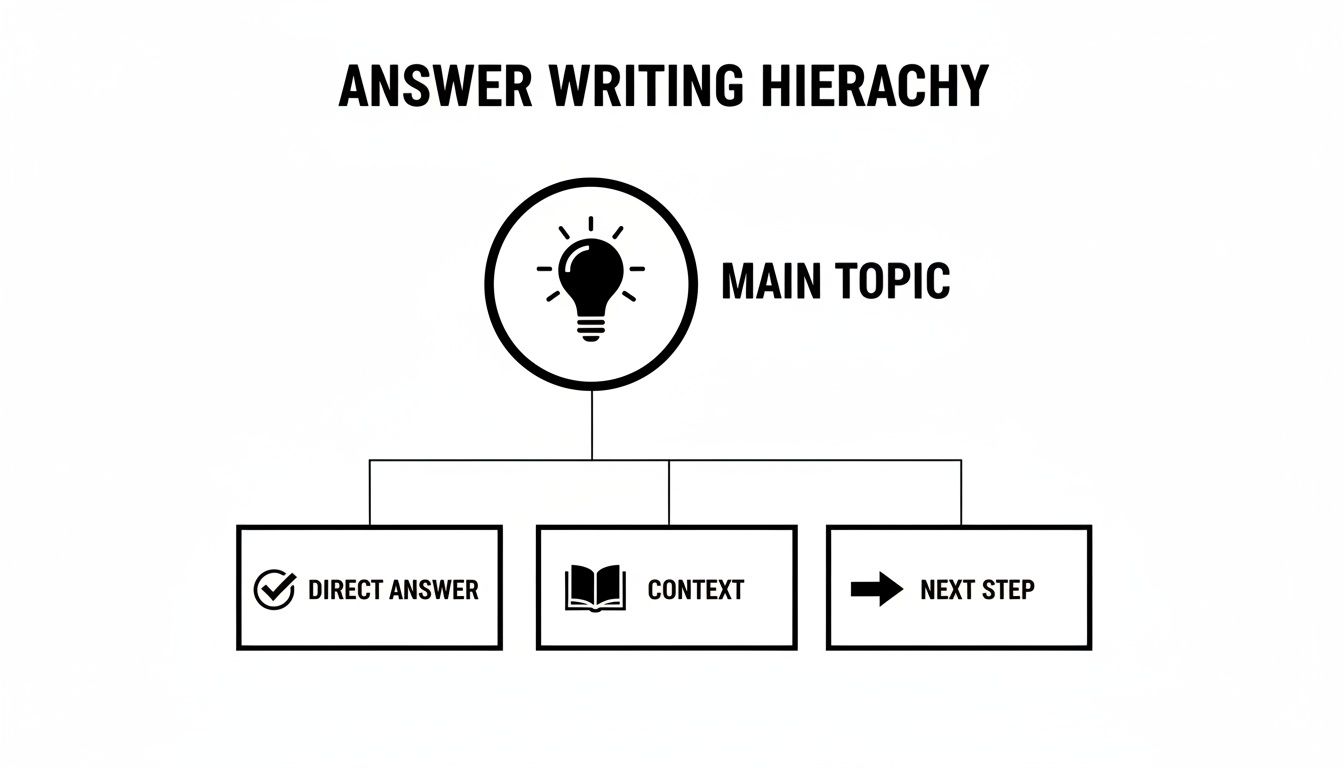
- Direct Answer: Start with a straightforward "yes" or "no," or the specific information they need. Make it the very first sentence.
- Helpful Context: Follow up with a sentence or two that adds important details or explains the why.
- Next Step: Finish with a clear call to action or a link. Should they visit another page? Add an item to their cart? This turns an answer from a dead end into a productive part of their journey.
Let's look at an example for the question, "Do you ship internationally?"
Before (Confusing):
Our shipping is optimized for domestic territories, but global distribution can be leveraged depending on carrier availability and customs regulations. Final costs are calculated based on destination.
After (Clear and Actionable):
Yes, we ship to most countries outside of the United States! International shipping costs are calculated at checkout. You can view our full list of supported countries on our Shipping Policy page.
The "after" version immediately gives the "yes," explains how it works, and points them to where they can learn more.
Speak Like a Human, Not a Robot
Your brand has a personality, and your FAQ page is the perfect place to let it shine. Writing in a natural, conversational tone makes your answers more engaging.
Actionable Tip: Frame questions from your customer's point of view. Use "How do I track my order?" instead of the robotic "What is the order tracking procedure?" For more on this, our guide on how to write website copy has excellent tips for developing your brand voice.
Use Formatting to Your Advantage
No one wants to read a wall of text. Breaking up your answers with smart formatting makes them scannable and easier to digest, especially on mobile devices.
Actionable Tip: Use these simple formatting tools to make answers more readable:
- Bold Text: Use bolding to highlight key information, like free returns or a 30-day guarantee.
- Bullet Points: Use bullet points to explain a multi-step process or list features.
- Internal Links: Link to other relevant pages on your site, like products, blog posts, or your contact page. This keeps users on your site longer and improves your SEO.
For a deeper dive into crafting persuasive text, explore these content marketing and copywriting best practices.
Structuring Your FAQ Page for Users and Search Engines
How you organize your questions is just as critical as the answers themselves. A random list of questions will frustrate visitors. A thoughtfully structured FAQ page guides both users and search engines directly to the information they need.
Group Questions into Logical Categories
Think of your FAQ page like a grocery store. Items are grouped into aisles like 'Dairy' and 'Produce' to make them easy to find. Apply that same logic to your FAQ page.
Actionable Tip: Group your questions into intuitive categories. This creates a smooth and efficient experience for your visitors.
For instance, a business using the Solo AI Website Creator might create categories like:
- Shipping & Delivery: All questions about order tracking and shipping times.
- Billing & Payments: Information on payment methods and refunds.
- Product Information: Details about materials, sizing, or how a product works.
- Account Management: Help with logging in or changing passwords.
This approach makes your page look professional and shows customers you've anticipated their needs.
What is FAQPage Schema Markup? (A Simple Explanation)
Let's talk about a powerful tool for getting Google’s attention: FAQPage schema markup. It sounds technical, but it's really just a special piece of code you add to your page. This code tells search engines, "Hey, this content is a set of questions and answers."
Think of it as giving Google a clear map of your content. When Google understands your page's structure, it can display your questions and answers directly in the search results as clickable dropdowns, known as "rich snippets."
Why Schema Is a Game-Changer for SEO
Using schema has a direct impact on your visibility. When your FAQ page earns a rich snippet, it takes up more space on the search results page, making it more eye-catching than standard links.
Data suggests that pages with correctly implemented FAQPage schema can increase their click-through rate by over 25%. That's a huge boost in qualified traffic without spending a dime on ads.
This extra visibility helps you stand out from the competition and establishes your site as an authority. If you're serious about your online presence, our complete small business SEO guide is packed with more strategies like this one.
While you don’t need to be a coder to add schema (many plugins and tools do it for you), understanding its importance is key. To maximize your chances of getting noticed, you can also learn how to optimize for featured snippets.
By combining smart categorization with schema markup, you’ll create an FAQ page that serves your customers and dramatically improves your search performance.
Bringing Your FAQ Page to Life with Solo AI Website Creator
You've found your customer questions, crafted clear answers, and planned a logical structure. Now it's time to build the page.
With the Solo AI Website Creator, this process is straightforward. You can focus on your content, not on complicated code or confusing menus.
Building the Foundation of Your FAQ Page
First, you need a place for your FAQ to live. In your Solo AI dashboard, create a new page and call it "Frequently Asked Questions."
Actionable Tip: Use the heading tool to create your categories, like "Shipping & Delivery." These act as signposts that break up the text and guide visitors to the right information. Under each heading, add your question-and-answer pairs.
Making Your FAQ Page Interactive and Actionable
A great FAQ page should do more than just provide information; it should drive action.
Actionable Tip: Turn answers into action by linking directly to relevant tools. If a question is "How do I schedule a consultation?", link a phrase like "book your free consultation here" directly to your scheduling calendar. This removes friction and makes it easy for a visitor to become a client.
Here are a few ways to make your FAQ page interactive:
- Link to Booking Calendars: Connect answers about services directly to your scheduling tool.
- Embed Contact Forms: Add a contact form at the bottom with a prompt like, "Still have questions? We’re here to help!"
- Connect to Product Pages: If a question is about a specific item, link directly to that product's page.
This approach turns your FAQ from a simple Q&A list into an active part of your sales and support process.
Maintaining Your FAQ Page for Long-Term Success
Your FAQ page is a living document. As your business evolves, so will your customers' questions. An FAQ page with outdated information can erode trust and create confusion.
Actionable Tip: Schedule a quarterly review of your FAQ page. Put a reminder in your calendar every three months.
During this check-in:
- Add New Questions: Scan recent customer communications for new, recurring questions.
- Refine Existing Answers: Check that all information is still accurate. Update any details on pricing, policies, or product features.
- Remove Irrelevant Content: If you've discontinued a product or service, remove those questions to avoid confusion.
Keeping your FAQ page fresh shows customers you are committed to providing them with the right information.
Got Questions About Your FAQ Page? We've Got Answers
Even with a solid plan, a few questions often come up. Let's tackle some of the most common ones.
How Many Questions Should I Include?
There's no magic number, but a great starting point is 10-15 of your most frequently asked questions. This is enough to be helpful without overwhelming visitors.
Actionable Tip: If your list grows beyond 20 questions, organize them into categories. A focused, well-organized page is always more effective than an exhaustive but cluttered one. You can always add more questions later as new patterns emerge.
How Often Should I Update My FAQ Page?
Your FAQ page is a living document. Plan to review and refresh it at least once every quarter. A regular check-in ensures all your information is accurate and trustworthy.
Actionable Tip: Put a recurring reminder in your calendar. During each review, ask:
- What new questions are we hearing?
- Is any information outdated?
- Can we improve any answers?
Keeping your content fresh signals to customers that you're on top of your game.
Can AI Actually Help Write My FAQ Content?
Yes, AI can be a brilliant assistant for getting started, but it shouldn't be the final author. Use AI tools to brainstorm common questions or to generate a rough first draft of an answer.
Actionable Tip: Always review, edit, and personalize any AI-generated content. AI doesn't know the specifics of your business, understand your customers' unique frustrations, or replicate your brand voice. Treat AI as a starting point, then add the human touch that makes your answers genuinely helpful and sound like you.
Ready to build an FAQ page that saves you time and builds customer trust? With Solo AI Website Creator, you can easily create, organize, and update your FAQ page with an intuitive interface designed for business owners, not developers. Start building your free, professional website today and turn your customer questions into a powerful business asset. Get started with Soloist AI.