
You open a blank draft, type a working title, and then stall. You know your business needs blog content, but the page feels too open-ended. Should you write a short tip list, a detailed guide, a client story, or something that feels more like a landing page?
That hesitation usually isn't a writing problem. It's a structure problem.
A good blog post format gives you a starting shape before you write a single sentence. It tells you what belongs near the top, what should come next, and where to place the pieces that help readers trust you, contact you, or keep reading. For a small business owner, that structure matters because your post isn't just content. It's a working page on your website.
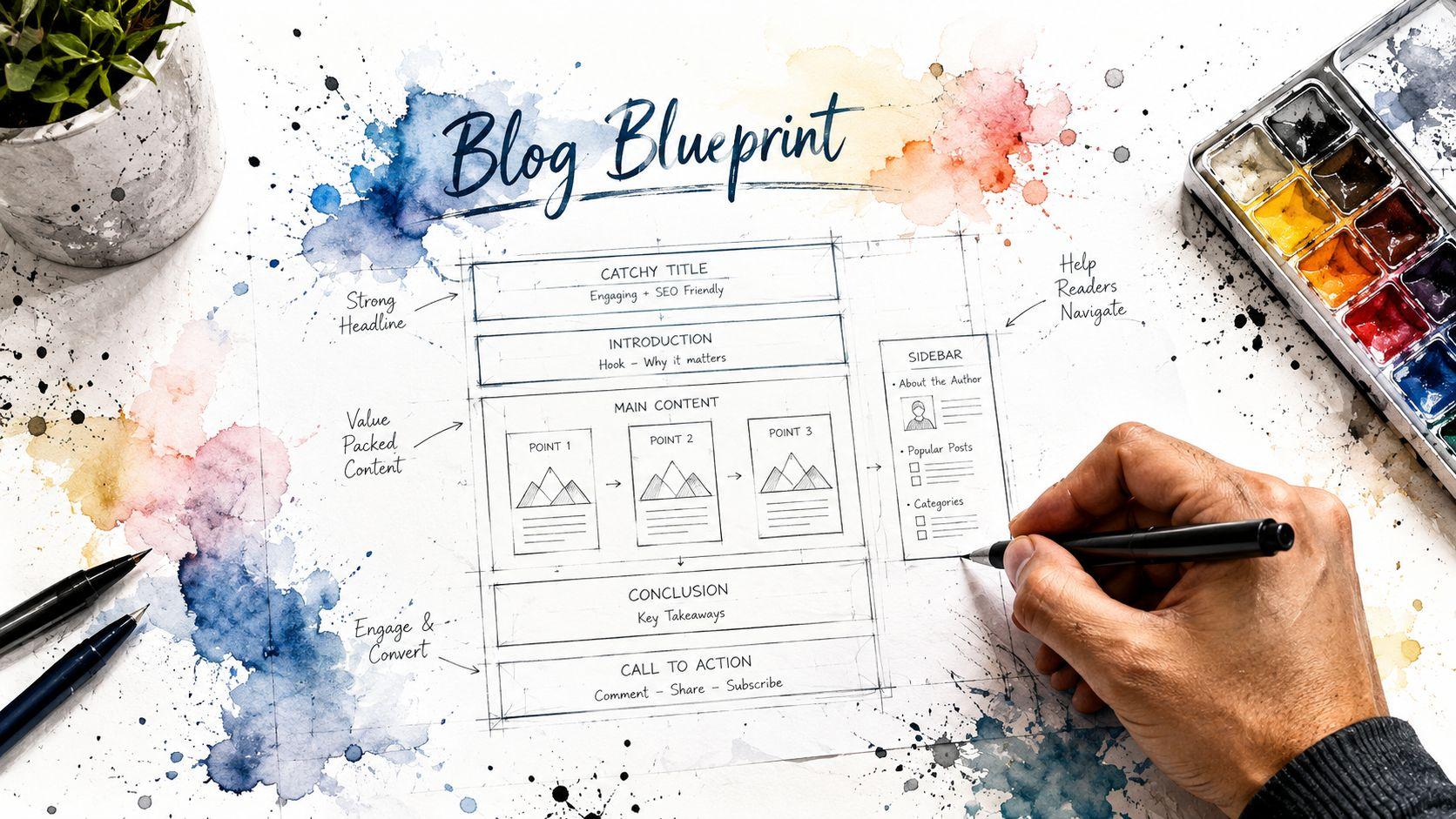
Why Your Blog Post Format Is a Blueprint for Success
Think of blog formatting like a house blueprint. A blueprint doesn't limit the design. It makes sure the kitchen doesn't end up where the bathroom should be. Your content works the same way. If the order is wrong, readers get lost, even when your ideas are good.

A practical rule from guidance on creating blog content places many posts in the 500-1,000 word range, with around 1,000 words often suggested when the topic is more complex. That same guidance treats the blog as a readable, focused format, usually centered on one topic and often supported by images and links rather than formal citations.
What format actually does
A clear format helps you do three jobs at once:
- Guide the reader: People rarely read from top to bottom on the first pass. They scan headings, bullets, and highlighted phrases.
- Support search visibility: Search engines use structure to understand what your article covers and how each section relates to the main topic.
- Move the reader toward action: A service business blog post should help someone book, contact, subscribe, or view another page.
Practical rule: If a reader can understand your post by skimming only the headings, your structure is probably doing its job.
Why business owners get stuck
Many people think formatting is a cosmetic step. It isn't. It's planning. If you start writing without deciding the shape of the post, you usually get one of two bad outcomes: a rambling article that says everything at once, or a thin post that never answers the core question.
Here's a simple way to decide your format before you write:
- Choose one goal: traffic, trust, leads, or education.
- Choose one main reader question: not three, just one.
- Choose the format that fits that question: guide, list, case study, or pillar-style resource.
- Map the sections before drafting: intro, key points, proof, next step.
That small amount of planning makes the writing easier. You aren't staring at a blank page anymore. You're filling in rooms on a blueprint.
Four Common Blog Formats for Any Business Goal
Different business goals call for different shapes. A blog post that tries to teach, persuade, and sell all at once usually does none of them well. Pick the format that matches the job.
Choosing the Right Blog Format
| Format Type | Best For | Key Strength |
|---|---|---|
| Listicle | Quick wins, social-friendly topics, beginner readers | Easy to scan |
| How-to guide | Search intent, education, evergreen topics | Clear step-by-step value |
| Case study | Leads, trust, service proof | Shows real-world application |
| Pillar page | Authority, broad topics, internal linking | Covers a topic in a structured way |
A reported trend from blogging statistics for 2026 says the average blog post length was 1,427 words, and posts over 2,000 words reportedly earned 77% more backlinks than posts under 1,000 words. That doesn't mean every post should be long. It means depth and structure often matter when the topic deserves them.
The listicle
A list post works when your reader wants options, examples, or fast takeaways. Think topics like "ways to improve your homepage copy" or "signs your booking page needs work."
This format is useful when:
- Your audience is new to the topic: Lists lower the reading effort.
- Each point can stand on its own: Readers can jump in anywhere.
- You want a lighter production process: You don't need a long narrative arc.
The risk is shallow content. A weak listicle is just a pile of tips. A strong one groups related points and explains why each one matters.
The how-to guide
A how-to post is your workhorse format for search-driven content. It fits questions that start with "how," "what steps," or "how do I fix."
Use it when the reader needs a sequence. For example, a photographer might write "How to prepare for a family photo session." A consultant might write "How to choose a CRM for a small team."
The best how-to posts remove friction. They don't just explain the topic. They help the reader make progress.
This format works especially well if your service solves the same problem the article explains.
The case study
A case study is part story, part proof. It shows how a problem looked before, what changed, and what someone learned along the way. For service businesses, this is one of the clearest paths from blog reader to future client.
It fits when you need to show:
- Process: How you think and work
- Judgment: Why you made certain choices
- Credibility: What kind of problems you solve
If you don't have formal client stories ready, you can still use a case-study style post by walking through a project, a redesign decision, or a common client scenario qualitatively.
The pillar page
A pillar page is broader and more structured than a standard post. It acts like a central guide to one topic, with sections that cover core subtopics in a logical order.
This is the right choice when your topic is big enough that a short post would feel fragmented. Examples include "small business website SEO," "wedding planning timeline basics," or "beginner's guide to nonprofit fundraising pages."
Pillar pages take more effort, but they give your site a stronger foundation because they organize knowledge instead of just publishing isolated articles.
Copy-and-Paste Templates for Your Solo Website
If formatting advice feels abstract, use a template. Templates reduce decision fatigue. You don't have to guess what comes next. You just replace prompts with your own expertise.
For small businesses trying to earn leads, mobile-first reading matters. Guidance on how to format a blog for readability points to short sections, strong subheads, bullets, and visual breaks as practical choices for low-attention readers. That's why the templates below are intentionally simple.

If you're drafting inside Solo AI Website Creator, you can use these as starting outlines for a blog page, then adjust the wording to fit your service, location, and customer questions.
Template one for an SEO how-to guide
Use this when someone is searching for an answer and you want your business to appear as the helpful expert.
Post title
How to [solve a specific problem]
Opening paragraph
Name the problem in plain language. Say who this post is for. Promise the outcome.
H2 Problem overview
What usually goes wrong?
Why does it matter?
H2 What you need before you start
Tools, materials, preparation, or common requirements.
H2 Step-by-step process
Step 1
Explain the first action.
Step 2
Explain the next action.
Step 3
Add any warning, tip, or shortcut.
H2 Common mistakes
Use bullets for quick scanning.
- Skipping the basics: Explain what readers overlook.
- Doing steps out of order: Explain why sequence matters.
- Stopping too early: Explain what "finished" should look like.
H2 When to get professional help
Describe the situations where a customer should contact a specialist.
H2 Next step
Add a soft call to action such as booking, contacting, or reading a related article.
If you want extra inspiration before drafting, this collection of blog content templates shows how different post structures can be adapted for business use.
Template two for a lead-generating case study
Use this when trust matters more than broad education.
Post title
How [type of client or project] solved [specific problem]
Opening paragraph
State the challenge and why it mattered.
H2 The starting point
What was happening before? What obstacles were in the way?
H2 The approach
Break your solution into a few stages.
H3 Decision one
Why you chose that direction.
H3 Decision two
What changed during the process.
H2 Lessons for similar businesses
Turn the story into practical advice the reader can apply.
H2 How to take the next step
Invite the reader to contact you, ask for an estimate, or view your services.
A blog draft doesn't need to start from scratch either. If you want a faster first version to revise, try a blog post generator.
A short walkthrough can help if you want to see content creation in motion:
Your Pre-Publish Blog Formatting Checklist
A draft can say the right things and still feel hard to read. Before you publish, run a quick formatting check. This isn't about perfection. It's about removing obvious friction.

Strong structure starts with hierarchy. A practical guide on blog post formatting and heading structure recommends one H1 for the title, then H2s for major sections and H3s for sub-sections. It also notes that technical content works better when readers see the problem, then background, then a high-level solution before deeper detail.
Structure checks
Look at the skeleton of the post before you read the sentences.
- One clear title: Your title should match the main question the post answers.
- Logical headings: H2s should be main sections. H3s should sit under the right H2, not jump randomly.
- Strong opening: The first paragraph should confirm the reader is in the right place.
- Useful ending: Don't just stop. Close with a next step or summary.
If your headings read like disconnected notes, the article probably needs reordering.
Readability checks
Now scan for visual clutter.
- Short paragraphs: Large blocks of text feel heavier on mobile screens.
- Bullets where they help: Use them for options, mistakes, steps, or quick takeaways.
- Bold with restraint: Highlight key phrases, not whole paragraphs.
- Plain language: Replace jargon with everyday words unless your audience expects technical detail.
If you need to reread a sentence to understand it, your customer probably will too.
Engagement checks
A blog post should give the reader places to pause and act.
- Add a useful image: Not decoration. Something that supports the point or breaks up dense text.
- Include internal links: Guide readers to related service pages or articles.
- Use one clear CTA: Ask for one action, not five.
- Check mobile spacing: Make sure sections don't feel cramped on a phone.
This final review is what turns a rough article into a business asset. Formatting isn't separate from quality. For online readers, formatting is part of quality.
Formatting Tips for SEO and User Experience
Search engines and human readers want similar things. They both need clarity. A messy page hides meaning. A well-structured page makes the topic easier to understand.
Write for scanners first
Most visitors don't begin by reading every line. They skim the headline, opening lines, subheads, and any bullet lists. If those elements are clear, they'll keep going.
That means your formatting should do quiet work in the background:
- Use descriptive subheads: They should tell the reader what's in the section.
- Keep sections focused: One section, one idea.
- Answer likely follow-up questions: This keeps the article cohesive.
Make the post easy to summarize
One of the biggest shifts in modern content is that your article may be read by systems that extract answers, not just by people scrolling the page. Guidance discussing AI overviews and answer engine visibility points toward a more structured, machine-summarizable style, with clear subtopics, direct answers, and FAQ-like coverage.
Clear formatting helps two readers at once: the person skimming on a phone and the system trying to identify the best answer snippet.
A practical way to apply that idea:
- Use question-based subheads when the topic is informational.
- Answer the question early in the section, not after a long setup.
- Add concise bullets where comparison or summary helps.
- Keep terminology consistent so the topic doesn't drift.
If you want to tighten the page itself, this guide to on-page SEO techniques is a useful next read.
Start Building Your Audience Today
A good blog post format isn't a rigid rulebook. It's a tool that helps you publish with purpose. When you match the format to the goal, writing gets easier and the final post works harder for your business.
A list post helps when readers want quick options. A how-to guide helps when they're searching for a process. A case study helps when they need proof. A pillar page helps when the topic is broad and your site needs a strong central resource.
Start smaller than you think you need to. Pick one customer question you hear all the time. Choose one of the templates above. Draft the headings first. Then fill in the sections as if you were answering that question for a real client across the table.
If you're still building confidence, read this introduction to blogging for beginners. Then publish one useful post instead of planning ten perfect ones.
The businesses that build an audience usually don't do it by waiting for inspiration. They do it by using a repeatable structure, showing up consistently, and making each post easier to read than the last.
If you're ready to turn ideas into published pages, try Solo AI Website Creator to create your site, organize your content, and put your next blog post to work.