
Your craftsmanship speaks for itself on the job site, but your website has to do a different job. It needs to answer fast questions from busy homeowners, reassure a commercial buyer that you're credible, and make it easy for someone on a phone to request a quote without digging through five pages. If your current site feels dated, slow, or hard to update, you're not alone.
Construction buyers often land on a site for the first time and decide quickly whether to keep going. In a benchmark study of construction websites, the average bounce rate was about 36%, with site-level bounce rates ranging from 21.95% to 48.76%, and 71.32% of sessions came from new users according to MAYECREATE's construction websites benchmark report. That's why construction website design templates matter. The right one helps first-time visitors find services, see proof of work, and contact you without friction.
Template-based websites are now the default for many service businesses. Industry guidance from Squarespace and Wix consistently pushes the same core pages: about, contact, project portfolio, testimonials, and clear calls to action like quote requests or scheduling. If you're still deciding between broader site approaches, this breakdown of how to compare website platforms for 2026 is a useful companion.
This guide gets straight to the best options. I've grouped them by what business owners need: fast launch, more design control, or WordPress flexibility.
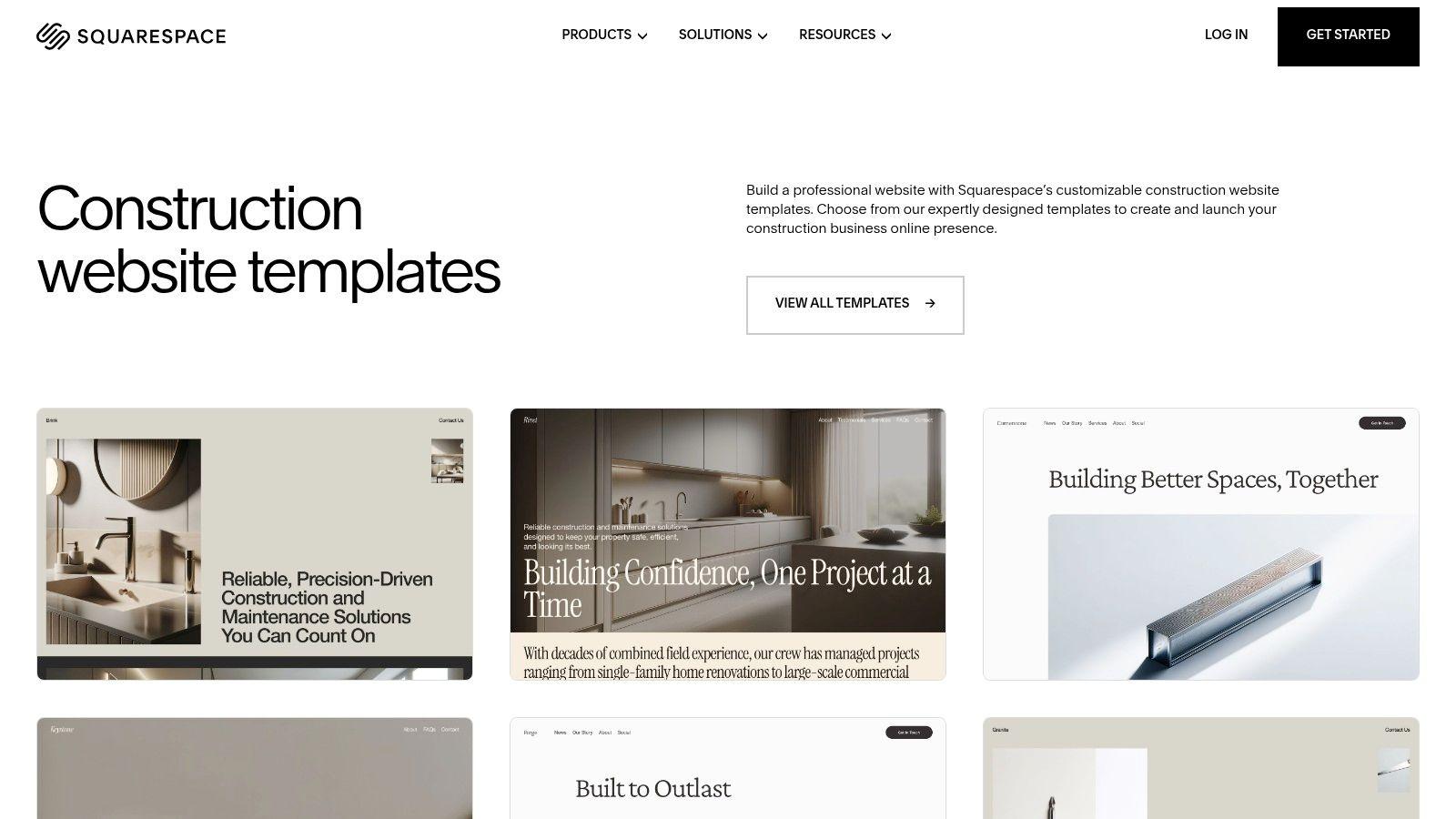
1. Squarespace Construction Website Templates

Squarespace construction templates are a good fit when you want a clean contractor site live quickly and you don't want to babysit hosting, security, or updates. The platform's strongest advantage isn't endless flexibility. It's that the default experience is polished, mobile-friendly, and hard to break.
For many construction businesses, that's enough. You get project galleries, forms, scheduling, analytics, and a visual editor without needing plugins or developer help. Squarespace's own guidance for construction sites emphasizes the pages most contractors need: about, contact, portfolio or project history, testimonials, and strong calls to action like quote requests or scheduling on its construction website guide.
Where Squarespace works best
If you're a remodeler, home builder, roofer, or specialty trade with strong photos, Squarespace makes that work look better with less effort. The editor is simple enough for non-technical owners, and global styles let you keep fonts, colors, and spacing consistent across the whole site.
That consistency matters more than many owners realize. BuildThis reports that 78% of construction company websites have consistent design in the broader pattern cited by Squarespace guidance, which reflects how standard template-based presentation has become for contractor websites.
- Best for fast launch: You can get service pages, a gallery, testimonials, and contact forms in place without hiring a developer.
- Best for owners who hate maintenance: Hosting, SSL, and performance basics are handled for you.
- Less ideal for custom workflows: If you need unusual calculators, deep integrations, or highly custom layouts, you'll hit limits sooner than with WordPress or Webflow.
Practical rule: Squarespace is strongest when your sales process is simple. Show work, explain services, add trust signals, then push people to call or request a quote.
2. Wix Construction Templates

Wix construction templates are often the quickest route to a usable contractor website if you want lots of prebuilt options and more built-in add-ons than Squarespace. Wix leans harder into drag-and-drop freedom, app extensions, and AI-assisted setup.
That flexibility is useful for contractors who want chat, booking, estimate forms, or lead capture tools without assembling a full WordPress stack. Wix also specifically recommends mobile-friendly design, easy navigation, contact forms, estimate requests, and online scheduling in its construction website advice, which lines up well with what converts on local service sites.
The trade-off with Wix
Wix gives you more levers. That's good until someone on your team starts dragging things all over the page and breaks visual consistency. In practice, Wix works best when one person owns the site and sticks to a clear layout system.
If you're comparing these two all-in-one platforms side by side, this Wix vs Squarespace comparison is worth reading before you commit.
- Choose Wix if you want options: More apps, more layout freedom, more marketing extras.
- Choose Wix if lead capture matters: Forms, chat, and booking are easier to layer in.
- Skip Wix if you redesign often: Template switching after publish can be limiting, so your first setup matters.
One caution. More freedom doesn't always mean a better contractor website. If your homepage turns into a collage of banners, badges, popups, and sliders, leads will drop because people can't find the next step.
3. Webflow Construction Templates (Marketplace)

Webflow construction templates sit in a different category. They're for companies that care a lot about visual presentation and want near custom-site control without going fully into hand-coded development.
Webflow shines when your construction business needs a sharper brand. Think commercial contractors, design-build firms, high-end remodelers, or builders who want polished project case studies with strong page layouts and content structure. The CMS is a real advantage because you can create repeatable collections for projects, team members, service areas, or testimonials.
Where Webflow earns the extra effort
The big win is control. You can shape layouts at a more granular level than Wix or Squarespace, and you can create a modern site that doesn't look like a standard template after a few hours of work.
The downside is the learning curve. If you just want to swap text and upload photos, Webflow can feel like using a framing nailer to hang a picture.
If your site is mostly a brochure with a quote form, Webflow is usually more tool than you need. If your website is a branded sales asset, it starts making sense.
A practical use case is a builder that wants separate CMS-driven pages for residential projects, commercial projects, team bios, and detailed service pages. Webflow handles that structure well. Just don't pick it unless someone on your side will manage it.
4. BuildPress (WordPress theme by ProteusThemes)

BuildPress is one of those WordPress themes that has stayed relevant because it focuses on what contractor sites need instead of chasing design trends. It's practical, stable, and built around construction-specific content blocks.
That makes it a safer choice than many flashy marketplace themes. You get one-click demo import, custom widgets, compatibility with popular builders, and WooCommerce support if you want to sell products, collect deposits, or add a parts store.
Why BuildPress still works
BuildPress is strongest for traditional contractor websites. Service pages, about pages, projects, testimonials, and contact info all fit naturally into the theme's structure. It doesn't force a hyper-modern design language that can feel wrong for local trades.
What I like about it is restraint. It gives you enough structure to move fast, but it doesn't bury you under a mountain of design effects.
- Good fit for established local firms: Especially general contractors, builders, and service companies with a straightforward sales process.
- Good fit for WordPress users: It plays well with a broader plugin ecosystem.
- Weak point: If you want highly custom landing pages or unconventional layouts, you'll probably need a page builder or light CSS work.
BuildPress is a dependable pick if your priority is a contractor website that feels credible and easy to update, not trendy.
5. Constructo (WordPress theme by AnpsThemes)

Constructo is built for contractors who want more marketing structure baked into the theme. It leans into service sections, estimate prompts, project grids, and industry-specific demos rather than leaving you with a blank canvas.
That's useful if you know what pages you need but don't want to architect everything from scratch. Elementor support also gives non-technical teams a more forgiving editing experience than older WordPress builder setups.
Best use for Constructo
Constructo works well when you serve multiple service lines or different audience types. A remodeling firm with kitchen, bath, additions, and exterior work can create clearer service segmentation without fighting the theme. A GC chasing both residential and commercial leads can also separate those paths more cleanly.
If you're trying to pick a layout framework before you commit, this guide on choosing a small business website template is useful alongside Constructo's demos.
- Strong point: Conversion-focused sections are already part of the design language.
- Strong point: Elementor makes content swaps easier for owners and office staff.
- Watch out for option overload: More demos and settings can slow you down if you keep second-guessing design choices.
The biggest mistake with Constructo is over-customizing it. Start with the demo closest to your business model, then replace content. Don't rebuild the entire thing on day one.
6. Renovate (WordPress theme by QuanticaLabs)

Renovate stands out for one reason. It treats quoting as part of the website, not an afterthought. The built-in cost calculator is the feature most contractors notice first, and for remodelers or handyman-style services, that can be useful.
Not every construction company should put a calculator on the site. But when the work is somewhat standardized, or when prospects always ask for rough pricing before they'll contact you, Renovate gives you a better pre-qualification tool than most themes.
Where Renovate helps most
This theme is best for renovation companies, home improvement firms, repair services, and trades with repeatable job types. If a visitor can choose a service, submit a few details, and feel like they're making progress toward a quote, you reduce friction.
That said, calculators can also attract poor-fit leads if they oversimplify the job. Treat them as conversation starters, not final pricing.
A quote tool should move leads closer to a call. It shouldn't replace the site visit, the scope review, or your judgment.
Renovate also includes plenty of builder components and demo content, which speeds up setup. Just be ready for plugin maintenance. Themes with more bundled functionality often need more attention over time.
7. Structure (WordPress theme by ThemeMove)

Structure is a classic WordPress choice for construction, industrial, engineering, and architecture firms that still prefer a more traditional site setup. It isn't trying to reinvent the wheel. That's part of its appeal.
If your team already knows WordPress, WPBakery, Contact Form 7, and the usual plugin stack, Structure will feel familiar. Familiar can be a feature when you don't want a learning curve.
Why some firms still choose it
A lot of contractor websites don't need the newest visual framework. They need reliable service pages, project listings, team pages, contact forms, and maybe some eCommerce support. Structure handles those standard requirements well.
Its niche demos are useful too. Engineering firms and architecture-adjacent businesses often want a slightly different tone than residential remodeling sites, and Structure supports that better than some one-style-fits-all themes.
- Good for proven workflows: Teams already comfortable with older WordPress builders.
- Good for industrial or engineering branding: The demos fit those categories naturally.
- Less ideal if you want modern editing: Newer builders feel more fluid and less bulky.
I'd recommend Structure when continuity matters more than novelty. If your office manager is already used to an older WordPress environment, switching to something radically different may create more friction than value.
8. BuildWall (WordPress theme on TemplateMonster)
BuildWall on TemplateMonster is the flexible option for agencies, multi-service firms, or contractor groups serving more than one niche. Its appeal is range. Different demo skins cover construction, architecture, and more corporate service presentations.
That versatility can save time if you manage several brands or if your business spans residential, commercial, and consulting work under one umbrella. You're not locked into one visual style from the start.
The real trade-off
Marketplace variety is helpful, but it also means you have to curate harder. Some demo skins feel sharper than others, and not every prebuilt section will match the way your company sells.
The best approach with BuildWall is to ignore half the demos. Pick the one closest to your actual buyer journey, then strip out anything that doesn't support contact, trust, or project proof.
One useful wider market signal sits behind that choice. Independent market research projects the global website builders market will reach USD 49.1 billion by 2034, growing at a 28.7% CAGR, and notes that DIY builders have powered more than 18 million websites worldwide, with the business website segment accounting for 86.7% of market share in Market.us research on website builders. For contractors, that reinforces the point that template-first deployment is mainstream, not a compromise.
9. Divi Construction Layout Pack (for WordPress + Divi)

Divi's Construction Layout Pack is a smart choice if you're already in the Divi ecosystem. It gives you a coordinated set of contractor-ready pages, then lets you customize everything visually inside Divi Builder.
This isn't a standalone theme in the same way some marketplace products are. It's more like a well-organized starting kit for a Divi site. If you already use Divi for other brands or client projects, that can be a major time saver.
When Divi is the right kind of fast
Divi works best for owners or small agencies who want repeatable design control without touching code. Headers, footers, page templates, and global styles can all be managed from one interface.
The danger is overbuilding. Divi gives you enough modules and styling options to spend hours nudging spacing and colors instead of launching.
- Use it when speed matters: Import the pack, swap in your content, and publish.
- Use it when branding consistency matters: Global styles are one of Divi's practical strengths.
- Avoid it if you want the leanest possible setup: Divi's feature set can feel heavy compared with lighter frameworks.
For many small construction businesses, Divi is most effective when you treat it like a system, not a playground.
10. Elementor Construction Template Kits (Envato)

Envato's guide to Elementor template kits points to a practical route many small businesses take. Instead of buying one heavy all-in-one theme, they assemble a WordPress site using Elementor and a coordinated template kit.
For construction businesses, that approach can be very efficient. You import a homepage, services page, projects page, about page, and contact page that already share the same fonts, colors, buttons, and section styles. That cuts down setup time and avoids the mismatched look that happens when people mix random page designs.
What to check before you buy a kit
Not all kits are equal. Some are clean and practical. Others look good in the preview but rely on extra plugins, pro features, or complicated import steps that frustrate non-technical users.
If you're considering this route, this guide on how to create a construction company website with AI is useful because it helps clarify what parts of setup should be automated and what still needs human judgment.
- Best for quick assembly: Especially if you already like Elementor.
- Best for niche styles: You'll find kits designed for residential, industrial, or specialty trades.
- Biggest risk: Quality varies by author, so always inspect documentation and required plugins first.
Template kits are often the fastest WordPress option when you want design cohesion without committing to one massive theme framework.
Top 10 Construction Website Template Comparison
| Template / Theme | Core features | Ease of use & customization | Best for / USP | Pricing & hosting |
|---|---|---|---|---|
| Squarespace Construction Website Templates | Modern responsive templates, Fluid Engine drag‑drop, built‑in SEO, forms, scheduling, analytics | Very low setup friction; limited granular control vs WP/Webflow | Contractors/remodelers who want a polished hosted site fast | Hosted by Squarespace; subscription plans (paid), includes SSL |
| Wix Construction Templates | Large template library, AI site setup, app marketplace (bookings/chat/estimates), mobile editor | Fast launch with drag‑drop; limited template switching after publish | Small contractors needing apps & quick online presence | Hosted by Wix; freemium → paid plans for custom domain/features |
| Webflow Construction Templates (Marketplace) | Webflow CMS, interactions, animations, pixel‑level design, code export option | High design control; steeper learning curve | Designers/agencies wanting bespoke, code‑quality sites without hand coding | Template purchase; hosted on Webflow (paid) or export for self‑hosting |
| BuildPress (ProteusThemes) | WP theme with custom widgets, one‑click demos, WooCommerce support | Stable and well‑documented; may need builders/CSS for advanced layouts | WordPress users wanting a purpose‑built contractor theme | Theme purchase (one‑time); self‑hosted (hosting costs apply) |
| Constructo (AnpsThemes) | 10+ demo homes, Elementor support, local SEO & performance optimizations | Conversion‑focused sections; many options can overwhelm beginners | Contractors focused on lead capture and local SEO | Theme purchase; self‑hosted |
| Renovate (QuanticaLabs) | Built‑in cost calculator, 50+ components, 12+ templates, WPML ready | Strong lead‑gen tools; relies on premium plugins → higher maintenance | Remodelers needing quote/estimator features | Theme purchase (ThemeForest); self‑hosted; premium plugins may add cost |
| Structure (ThemeMove) | Multiple niche demos (engineering/architecture), WPBakery, WooCommerce ready | Mature and straightforward; uses older page‑builder patterns | Teams preferring classic WP stacks and niche demos | Theme purchase (ThemeForest); self‑hosted |
| BuildWall (TemplateMonster) | Multipurpose skins, Elementor compatibility, SEO‑friendly structures | Versatile but demo quality varies; requires curation | Agencies covering multiple contractor niches | Marketplace purchase (TemplateMonster); self‑hosted |
| Divi Construction Layout Pack | 9+ premade pages, Divi Builder visual editing, global styles | Very fast if using Divi; requires Divi theme/membership | Divi users wanting quick, polished contractor site | Included with Divi membership (paid); self‑hosted |
| Elementor Construction Template Kits (Envato) | Coordinated full‑site kits, global styles, works with free/Pro Elementor | Rapid assembly; quality varies by author; plugin setup needed | Elementor users who want mix‑and‑match section kits | Kit purchase on Envato; self‑hosted; some kits require Elementor Pro |
Start Laying Your Digital Foundation Today
Choosing from construction website design templates is only the first decision. The key difference comes from how you use the template after install. A good site doesn't just look professional. It answers buyer questions quickly, shows real proof of work, and makes contacting you easy from any device.
Most contractors don't need a fancy website. They need a clear one. In practice, that means strong service pages, recent project photos, testimonials, visible contact options, and calls to action that match the kind of lead you want. If you handle emergency work, make the phone number impossible to miss. If you sell larger planned projects, guide visitors toward a quote form with enough detail to qualify the opportunity.
Content structure matters as much as design. Construction websites historically perform best when they reduce friction for first-time visitors, and benchmark data supports that broader design principle. Keep each core service on its own page. Add service-area references naturally. Show before-and-after work where possible. Use captions that explain the job, not just the location. A project gallery without context looks nice, but a gallery with scope, challenge, and outcome builds trust.
Mobile experience is essential. Google has reported that 61% of users are unlikely to return to a mobile site they had trouble accessing, and 53% of mobile visits are abandoned if pages take longer than 3 seconds to load, as noted in Gola's construction template roundup. That's why I usually tell contractors to remove anything that slows the site down without helping a lead convert. Autoplay video backgrounds, oversized sliders, and cluttered homepages are common offenders.
One overlooked decision is separating residential and commercial pathways when you serve both. Those buyers often want different proof, different language, and different next steps. Your template should let you create that distinction without making the navigation confusing. For this purpose, Webflow CMS structures, well-planned WordPress builds, or even a simple all-in-one platform with clean page organization can outperform a prettier but less practical design.
There's also a bigger market trend behind all this. The global design templates market was valued at $4.7 billion in 2024, with enterprise applications representing nearly 45% of total revenue, online distribution channels exceeding 85% of sales, and web-based platforms accounting for over 58% of revenue according to Market Intelo's design templates market report. For a construction business owner, the takeaway is simple. Browser-based, reusable, easy-to-update systems are where the market has settled.
If you want to build fast, borrow the best ideas from these templates instead of copying every visual trend. Start with five essentials: a strong homepage headline, a service grid, a projects section, proof like reviews or testimonials, and one clear contact path. Then add service pages for your main offerings and a project page format you can repeat every time you finish a job.
That's also where Solo AI Website Creator can fit. If you don't want to wrestle with WordPress setup or template imports, Solo AI Website Creator can help you generate a professional starting point from simple business inputs, then organize sections like services, contact, reviews, and booking into a usable site structure. For a contractor who wants to launch quickly, that can be a practical shortcut.
Take the template style that matches your business, keep the navigation simple, and publish the clearest version of your company online. That's what wins trust before the first call.
If you want to get a construction website online without sorting through theme files, plugins, or hosting setup, Solo AI Website Creator is a straightforward place to start. You can turn a few business details into a live site structure, then refine the services, project sections, contact forms, and SEO basics as you go.