
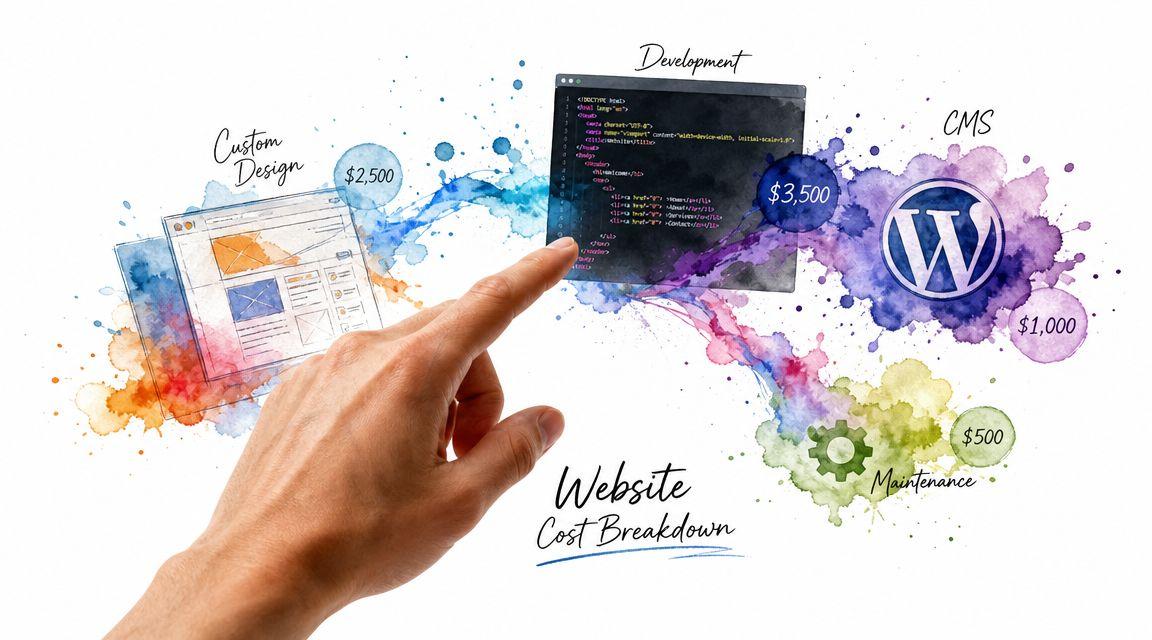
A professional website for a small business often costs $2,000 to $10,000, and that range can go higher once you add e-commerce, booking, or custom features. The cost depends almost entirely on the path you choose and what you need the site to do for your business.
If you're pricing websites right now, you're probably seeing quotes that seem wildly inconsistent. One option looks cheap, another looks expensive, and both claim to be “professional.” That's confusing when you just want a site that makes your business look credible and helps people contact, book, or buy.
The easiest way to think about it is this. A website is a lot like a building. A simple five-page service site is like a clean, practical office. An online store with booking, payments, customer accounts, and connected software is more like a retail space with a back office, security system, and custom wiring. Both are “buildings,” but they don't cost the same because they solve different problems.
The Real Answer to Your Website Cost Question
You ask three web designers for a quote. One says $1,200. Another says $4,500. A third comes back at $12,000. All three say they can build a professional website.
That does not mean one is honest and the others are overpriced. It usually means they are pricing different jobs.
A website budget works a lot like the cost of owning a car. The sticker price matters, but so do insurance, maintenance, fuel, and repairs over time. Your website has the same pattern. The build cost is only the starting point. Hosting, domain renewal, software licenses, updates, content edits, security monitoring, and occasional fixes all add to your total cost of ownership over three years.
That three-year view is the one small-business owners should care about most.
A lower quote can cost more in practice if it leaves out setup, training, support, or future changes. A higher quote can be the better value if it includes the systems your business will use and keeps your ongoing costs predictable. For example, your hosting choice affects both performance and recurring expenses, which is why it helps to understand how to choose a web hosting service before you compare proposals.
Price lives in the build, then in the upkeep
A simple brochure site works like a basic office lease. You get a clean presence online, but very little operational complexity. A site with online payments, bookings, customer accounts, or third-party software connections works more like a storefront with registers, cameras, inventory tools, and back-office systems. The second option costs more to build, and it also costs more to run.
That is where many first-time buyers get surprised. They compare only the launch price, even though the ongoing costs often decide whether the site feels affordable six months later.
Useful rule: Budget for the first three years, not just launch day. A website that costs less upfront but needs frequent paid fixes can become the expensive option.
Support work after launch often includes plugin updates, form testing, backups, uptime monitoring, and small content changes. If your business depends on lead forms or email notifications, technical details outside the site itself can affect results too. For example, teams handling email delivery issues often end up debugging DNS for inbox placement, because website and domain setup are closely connected.
So what is the right answer to "how much does a professional website cost?"
It depends on what the site needs to do, how much upkeep it will require, and what it will cost you to own and operate over the next three years. That is the number worth planning for.
What Actually Determines Your Website's Price Tag
Most website quotes become easier to understand once you break them into parts. Here are the seven cost drivers that usually matter most.

Custom design
A custom design is your website's visual blueprint.
If you use a template, you're starting from a pre-made floor plan. That keeps costs lower because a designer adjusts an existing structure. If you want a one-of-a-kind look built around your brand, the team has to create layouts, visual rules, and page patterns from scratch. That takes more strategy and design time.
Development and functionality
Development is the work that makes the website behave the way you need.
A contact form is simple. A booking engine, custom quote calculator, member login, or product filtering system is not. Each extra function adds setup, testing, and often troubleshooting. This is why functionality often changes price faster than page count.
Content management system
A CMS is the tool you use to update your site later.
If your site runs on a straightforward platform, updating text and photos may be easy. If it depends on a stack of plugins, custom fields, and layered settings, you may need technical help whenever you want to make changes. A cheaper build can become expensive later if the editing experience is clunky or fragile.
E-commerce capabilities
Selling online adds a different level of complexity.
A store needs product pages, checkout, payment setup, tax logic, shipping rules, confirmations, and customer flows. Even a small store requires more setup than a service business site. That's why e-commerce pricing usually rises quickly once real store operations enter the picture.
Third-party integrations
Integrations connect your website to other systems.
Examples include appointment software, CRM tools, email platforms, review tools, payment systems, or internal business software. Each connection creates convenience, but it also creates technical dependencies. When one system changes, your site may need updates too.
If your business depends on professional email and form delivery, technical setup matters more than many owners realize. Even support issues can trace back to domain configuration, so a practical resource like debugging DNS for inbox placement can help you understand why website forms or business email sometimes misbehave after launch.
Ongoing maintenance
Maintenance is the cost people forget when comparing quotes.
A 2026 cost breakdown estimates DIY sites at roughly $60 to $300 per year, freelancer-built sites at $1,000 to $10,000, and agency projects at $10,000 to $50,000+, with separate maintenance support commonly adding $50 to $200 per month. For more complex custom sites, maintenance alone may range from $400 to $60,000 per year depending on functionality (Elementor's 2026 website cost breakdown).
That sounds technical, but the business meaning is simple:
- Hosting and uptime: Your site has to stay online.
- Security and updates: Software has to be patched.
- Plugin and app maintenance: Add-ons need compatibility checks.
- Backups and recovery: Problems need a rollback plan.
If you're still sorting out infrastructure choices, this guide on how to choose a web hosting service helps translate hosting jargon into business terms.
A low upfront quote can still produce a high long-term bill if it relies on constant patching, paid add-ons, or hard-to-edit custom work.
SEO setup
SEO is how your site gets understood by search engines and users.
This doesn't just mean keywords. It includes page structure, titles, metadata, internal linking, mobile usability, and content organization. A site can look attractive and still be weak at attracting search traffic if the foundation is sloppy. Better SEO planning usually adds strategy time up front, but it often prevents rework later.
DIY, Freelancer, or Agency Which Path Is Right for You
You're not only choosing a website. You're choosing how it gets built. That decision shapes your cash cost, time cost, and stress level.
One industry guide notes that hiring help on a template platform can start around $2,500, while a bespoke web application with integrations can reach $100,000+. Another 2026 guide says a one-page website can cost $500 to $5,000, and a professionally built small-business site often begins around $3,000 and rises with complexity. GoDaddy's 2026 pricing also shows $640+ one-time for a simple website-builder approach, $5,000+ for a small-to-medium ecommerce site, and $15,000+ for a large bespoke business site (Chariot Creative's professional website cost guide).
DIY
DIY is usually the lowest cash-cost path, but it asks for the most owner involvement.
You'll spend time choosing a layout, writing content, collecting images, setting up forms, and learning the platform. For a simple site, that can be a smart trade. For a business owner already stretched thin, the hidden cost is delay. The site stays “almost done” for weeks because nobody owns the final details.
A tool like Solo AI Website Creator fits this path. It's a free AI website creator that helps users launch a site from simple inputs, with features such as custom domain hosting, booking integration, contact forms, and SEO tools. That makes it practical for owners who want a professional online presence without managing a traditional web project.
Freelancer
A freelancer is the middle option.
You get more customization than DIY and usually more flexibility than an agency. This path often works well when you know what you need, have a clear scope, and want one person to build it. The risk is uneven process. Some freelancers are excellent. Some disappear. Some build sites that look fine but are hard to maintain.
Agency
An agency is the highest-service option.
You're paying for process, coordination, strategy, design, development, and usually support after launch. That makes sense when the website is central to sales, lead generation, operations, or multiple stakeholders. It can be overkill for a basic brochure site. It can be exactly right for a business that needs complex functionality and accountability.
If you want a clearer sense of what success should look like after launch, it helps to review practical measures like understanding local marketing KPIs. That keeps you from buying a site that looks polished but doesn't support your real business goals.
Website Build Options Compared
| Factor | DIY (e.g., Solo AI Website Creator) | Freelancer | Agency |
|---|---|---|---|
| Cash cost | Lowest upfront in many cases | Mid-range | Highest |
| Time required from you | Highest | Moderate | Lower after kickoff |
| Customization | Limited to platform options and your skill | Moderate to high | High to very high |
| Speed to launch | Fast if scope is simple and you make decisions quickly | Depends on freelancer availability | Depends on process and approvals |
| Best fit | New businesses, simple sites, budget-first decisions | Businesses needing help without full agency pricing | Businesses treating the website as a major business asset |
| Main risk | You become the bottleneck | Quality and reliability vary | You can overbuy |
For a broader look at platform-based options, this overview of a website builder for small business needs is useful when you're deciding how much control you want versus how much complexity you're willing to manage.
Example Website Budgets From a Local Cafe to an Online Store
A useful website budget starts with one question. What job is the site doing for the business over the next three years?
That framing changes the conversation. A simple site that answers common questions costs very differently from a site that books appointments or processes orders every day. The build price matters, but the bigger business decision is total cost of ownership over time, including updates, subscriptions, and the extra work created when the site becomes part of daily operations.

The local cafe
A neighborhood cafe usually needs the digital version of a good storefront sign. Clear hours, menu highlights, location, photos, and a simple way to ask about catering or private events.
This kind of site often stays on the lower end because it mainly helps people decide to visit. Over three years, the main budget question is not only "what does it cost to launch?" but also "who updates seasonal menus, holiday hours, new photos, and event announcements?" A low upfront quote can become expensive if every small edit turns into a paid support request.
Costs rise when the cafe wants the website to do more than inform. Online ordering, gift cards, loyalty tools, event calendars, and multi-location pages all add setup work and ongoing maintenance. It works like the difference between renting a small counter space and opening a full second service station. More moving parts mean more to maintain.
The service business with scheduling
A plumber, salon, consultant, med spa, or clinic usually needs a website that moves a visitor toward action. That means stronger service pages, trust signals, FAQs, lead capture, and sometimes booking or intake forms.
Once scheduling enters the picture, the website starts acting less like a brochure and more like a receptionist. It has to collect the right details, route inquiries correctly, confirm appointments, and reduce back-and-forth. That usually increases both the build cost and the 3-year ownership cost because bookings depend on third-party tools, software connections, and periodic fixes.
A practical way to estimate this type of project is to map the customer path:
- Learn: Understand services, service area, and credibility
- Compare: Review options, pricing approach, and testimonials
- Act: Call, submit a form, or book an appointment
- Confirm: Get follow-up details and next steps
Businesses in local service categories also need visibility in search, not just a polished design. If you're planning niche service pages and local discovery content, studying something specific like Bare Digital's SEO playbook can give you useful ideas for how specialized businesses structure pages people can find.
Here's a helpful visual explainer before the final example:
The growing online store
An online store changes the budget more than any other common small-business setup. The website now has to manage products, checkout, payments, customer emails, taxes, shipping rules, and sometimes inventory sync.
That is why ecommerce budgets climb faster. You are no longer paying for pages alone. You are paying for a sales system. Over three years, software fees, payment integrations, product updates, app subscriptions, and troubleshooting often matter as much as the original design and development work.
A small catalog with a few products is one thing. A store with variants, bundles, subscriptions, customer accounts, promotions, and fulfillment rules is another. The second setup may look similar on the surface, but behind the scenes it behaves more like business infrastructure.
A cafe site answers questions. A service site captures and manages leads. An online store handles transactions and operational details. As the site takes on more business work, the smarter budget is the one that accounts for ownership costs after launch, not just the price of getting it live.
If you want a more detailed benchmark for your own situation, this guide to small business website cost by business type and feature set can help you connect your needs to a more realistic budget.
Smart Ways to Reduce Your Website Costs
The smartest way to cut website costs isn't to chase the cheapest quote. It's to lower your total cost of ownership, or TCO.
That means looking at what you'll spend over time, not just what you'll pay to launch.

A major budgeting gap in website planning is that owners often focus on build price and ignore the bills that come afterward. Multiple 2026 guides summarized in Pronto Marketing's calculator note that maintenance can run from $30 to $1,000+ per month for small-to-corporate sites and up to $5,000+ per month for ecommerce or dynamic sites, hosting commonly ranges from $3 to $250 per month, and ongoing maintenance for a small business site is often $50 to $200 per month (Pronto Marketing's website cost calculator analysis).
Start with the smallest useful version
You probably don't need every feature on day one.
Launch the version that can do the job now. That might mean a homepage, services, about, contact, and one conversion path. You can add advanced booking, gated content, multilingual pages, or complex automations after the site proves its value.
Cut complexity before you cut quality
Most cost overruns come from unclear scope.
Use this filter when evaluating features:
- Must-have: Without it, the site can't support the business goal.
- Nice-to-have: Useful, but not necessary for launch.
- Later: Better added only after real customer demand appears.
This approach protects both budget and momentum.
Prefer fewer moving parts
Every separate plugin, tool, or integration creates another thing to renew, update, and troubleshoot.
Bundled or simpler setups often reduce long-term support costs because fewer components can break. That matters over a 3-year ownership window, especially for a small team without in-house technical help.
Cost-saving mindset: The cheapest launch isn't always the cheapest website. The lower-cost website is the one you can maintain without constant paid fixes.
Ask for the 3-year cost, not just the build cost
When you review a quote, ask three direct questions:
- What will I pay to launch?
- What will I pay monthly or yearly to keep it running?
- What will I pay when I need edits, updates, or added features?
That turns a vague proposal into a business decision.
Your Website Decision Checklist and Next Steps
If you're still deciding, don't start with design. Start with business reality. A good website decision usually comes from honest answers to a few simple questions.
Your checklist
- What is the main job of the site? Do you need credibility, leads, bookings, sales, or all four?
- How fast do you need to launch? A shorter timeline usually favors simpler scope.
- Who will update the site later? If the answer is “probably me,” ease of editing matters a lot.
- How much complexity do you need now? Booking, checkout, integrations, and custom workflows all increase cost.
- What can you comfortably spend over 3 years? Think beyond launch and include maintenance, hosting, support, and future changes.
- How involved do you want to be? Some owners want control. Others want a partner who handles everything.
- What happens if the site breaks? If downtime would hurt revenue or customer trust, support matters more.
If this, then that
Here's the practical version.
- If your budget is very limited and you need to launch quickly, then start with a simple platform-based site and keep the feature list tight.
- If you want a polished site but don't need deep custom systems, then a freelancer is often a sensible middle ground.
- If your website will support sales, operations, multiple stakeholders, or custom workflows, then agency help may be worth the added cost.
- If you're unsure what features matter most, then write down the top three actions a visitor should take on the site before requesting any quote.
- If you're comparing estimates, then ask each provider to separate build cost from recurring cost and future edit cost.
A clear decision usually comes from matching the build path to your current stage, not your ideal future stage. You can always grow the site later. You don't need to buy the final version of your business on day one.
Frequently Asked Questions About Website Costs
Does a one-page website always cost less?
Not always. A one-page site can still cost more than a multi-page site if it includes custom design, advanced interactions, booking, or other special functionality. Scope matters more than page count.
What's the difference between hosting and maintenance?
Hosting keeps the website online. Maintenance is the ongoing work required to keep it secure, updated, and functioning properly. They're related, but they aren't the same thing.
Why do website quotes vary so much?
Because providers are often pricing different things. One quote may include strategy, content structure, setup, testing, and support. Another may only include design and basic launch. Always ask what's included.
Is DIY only for very small businesses?
No. DIY can work well when the site's job is straightforward and the owner is comfortable making decisions and updates. It becomes harder when the website needs custom functionality or complex integrations.
How should I think about cost over 3 years?
Treat the website like an operating asset, not a one-time purchase. Add the launch cost to expected hosting, maintenance, support, renewals, and likely updates over time. That's the number that tells you what the site really costs.
Can I start simple and upgrade later?
Yes, and that's often the smarter move. A focused launch with essential pages and one clear conversion goal usually beats an oversized project that takes too long and costs too much.
If you want to launch without turning your website into a major project, Solo AI Website Creator is one practical option to explore. It lets you create and publish a professional website from simple inputs, which can make sense when your immediate goal is to get online quickly and keep long-term website complexity under control.